<!DOCTYPE html>
    <html lang="vi" xmlns="http://www.w3.org/1999/xhtml" prefix="og: http://ogp.me/ns#">
    <head>
<title>Hướng dẫn cấu hình Email Server trên SMARTPHONE ANDROID</title>
<meta name="description" content="Hướng dẫn cấu hình Email Server trên SMARTPHONE ANDROID - Savefile - Tin Tức -...">
<meta name="author" content="Đăng ký tên miền, hosting uy tín tại Việt Nam">
<meta name="copyright" content="Đăng ký tên miền, hosting uy tín tại Việt Nam">
<meta name="generator" content="Tên miền, Web Hosting, Email, VPS &amp; Dịch vụ lưu trữ Website Việt Nam">
<meta name="viewport" content="width=device-width, initial-scale=1">
<meta http-equiv="Content-Type" content="text/html; charset=utf-8">
<meta property="og:title" content="Hướng dẫn cấu hình Email Server trên SMARTPHONE ANDROID">
<meta property="og:type" content="website">
<meta property="og:description" content="Savefile - Tin Tức - https&#x3A;&#x002F;&#x002F;www.buctuongso.com&#x002F;savefile&#x002F;kien-thuc-chung&#x002F;huong-dan-cau-hinh-email-server-tren-smartphone-android-24.html">
<meta property="og:site_name" content="Đăng ký tên miền, hosting uy tín tại Việt Nam">
<meta property="og:url" content="https://buctuongso.com/kien-thuc-chung/huong-dan-cau-hinh-email-server-tren-smartphone-android-24.html">
<link rel="shortcut icon" href="https://www.buctuongso.com/uploads/global.jpg">
<link rel="canonical" href="https://buctuongso.com/kien-thuc-chung/huong-dan-cau-hinh-email-server-tren-smartphone-android-24.html">
<link rel="alternate" href="https://www.buctuongso.com/rss/" title="Tin Tức" type="application/rss+xml">
<link rel="alternate" href="https://www.buctuongso.com/rss/kien-thuc-chung/" title="Tin Tức - Kiến thức chung" type="application/rss+xml">
<link rel="alternate" href="https://www.buctuongso.com/rss/kien-thuc-ve-email-server/" title="Tin Tức - Kiến thức về Email Server" type="application/rss+xml">
<link rel="alternate" href="https://www.buctuongso.com/rss/kien-thuc-ve-ten-mien/" title="Tin Tức - Kiến thức về Tên miền" type="application/rss+xml">
<link rel="alternate" href="https://www.buctuongso.com/rss/kien-thuc-ve-cloud-hosting/" title="Tin Tức - Kiến thức về Cloud Hosting" type="application/rss+xml">
<link rel="alternate" href="https://www.buctuongso.com/rss/kien-thuc-ve-chung-chi-ssl/" title="Tin Tức - Kiến thức về Chứng chỉ SSL" type="application/rss+xml">
<link rel="alternate" href="https://www.buctuongso.com/rss/Tuyen-dung/" title="Tin Tức - Tuyển dụng" type="application/rss+xml">
<link rel="preload" as="script" href="https://www.buctuongso.com/assets/js/jquery/jquery.min.js">
<link rel="preload" as="script" href="https://www.buctuongso.com/assets/js/language/vi.js">
<link rel="preload" as="script" href="https://www.buctuongso.com/assets/js/global.js">
<link rel="preload" as="script" href="https://www.buctuongso.com/themes/default/js/news.js">
<link rel="preload" as="script" href="https://www.buctuongso.com/themes/default/js/main.js">
<link rel="preload" as="script" href="https://www.buctuongso.com/themes/default/js/bootstrap.min.js">
<link rel="stylesheet" href="https://fonts.googleapis.com/css?family=Roboto+Condensed:400,700%7CRoboto:300,400,500,700,900%7COpen+Sans:300,400,600,700,800&subset=vietnamese" />
<link rel="StyleSheet" href="https://www.buctuongso.com/assets/css/font-awesome.min.css">
<link rel="StyleSheet" href="https://www.buctuongso.com/themes/default/css/bootstrap.min.css">
<link rel="StyleSheet" href="https://www.buctuongso.com/themes/default/css/style.css">
<link rel="StyleSheet" href="https://www.buctuongso.com/themes/default/css/style.responsive.css">
<link rel="StyleSheet" href="https://www.buctuongso.com/themes/default/css/news.css">
<style>
	body{background: #fff;}
</style>
    </head>
    <body>
<div id="print">
	<div id="hd_print">
		<h2 class="pull-left">Đăng ký tên miền, hosting uy tín tại Việt Nam</h2>
		<p class="pull-right"><a title="Đăng ký tên miền, hosting uy tín tại Việt Nam" href="https://www.buctuongso.com/">https://www.buctuongso.com</a></p>
	</div>
	<div class="clear"></div>
	<hr />
	<div id="content">
		<h1>Hướng dẫn cấu hình Email Server trên SMARTPHONE ANDROID</h1>
		<ul class="list-inline">
			<li>Thứ năm - 22/04/2021 06:19</li>
			<li class="hidden-print txtrequired"><em class="fa fa-print">&nbsp;</em><a title="In ra" href="javascript:;" onclick="window.print()">In ra</a></li>
			<li class="hidden-print txtrequired"><em class="fa fa-power-off">&nbsp;</em><a title="Đóng cửa sổ này" href="javascript:;" onclick="window.close()">Đóng cửa sổ này</a></li>
		</ul>
		<div class="clear"></div>
		<div id="hometext">
			Trên Smartphone có rất nhiều ứng dụng Email hỗ trợ cấu hình và sử dụng Email server. Thường chúng ta hay sử dụng app Gmail để cấu hình sử dụng mail trên điện thoại. Nhưng nếu khi muốn cấu hình thêm một Email server lên điện thoại ngoài mail Gmail đã cài sẵn thì chúng ta có thể add thêm một tài khoản vào app gmail, việc này sẽ gây ra khó khăn khi quản lý nhiều tài khoản khó khă hơn và có thể gây nhầm lẫn giữa các email. Để giải quyết nhược điểm trên, chúng ta có thể dùng thêm một ứng dụng thư khác để quản lý tài khoản Email server còn lại. Trong bài này sẽ hướng dẫn bạn tải app email phù hợp với cấu hình cũng như giao diện sử dụng cho Email server trên điện thoại.
		</div>
		<div id="bodytext" class="clearfix">
			<span style="font-size:16px;">Mở điện thoại vào CH Play đối với điện thoại dùng hệ điều hành Android, gõ ô search “Email” sẽ xuất hiện danh sách ứng dụng thư, ở đây chúng ta sẽ chọn ứng dụng <strong>Email – Lightning Fast &amp; Secure Mail </strong>để sử dụng: (Có thể dùng ứng dụng cho cả IOS).<br  />
&nbsp;</span>
<div style="text-align:center"><img alt="mail1" height="1600" src="https://www.buctuongso.com/uploads/news/2021_04/mail-android/mail1.jpg" width="904" /></div>
<br  />
<br  />
<span style="font-size:16px;">&nbsp;Nhấp vào cài đặt để tải ứng dụng về điện thoại.&nbsp;Tiếp theo, mở ứng dụng Email và chọn <strong>“Add Other Account”</strong> và nhấn <strong>Other </strong>để đăng nhập tài khoản <strong>Email server</strong>:<br  />
&nbsp;</span>

<div style="text-align:center"><img alt="mail2" height="1600" src="https://www.buctuongso.com/uploads/news/2021_04/mail-android/mail2.jpg" width="720" /></div>
<br  />
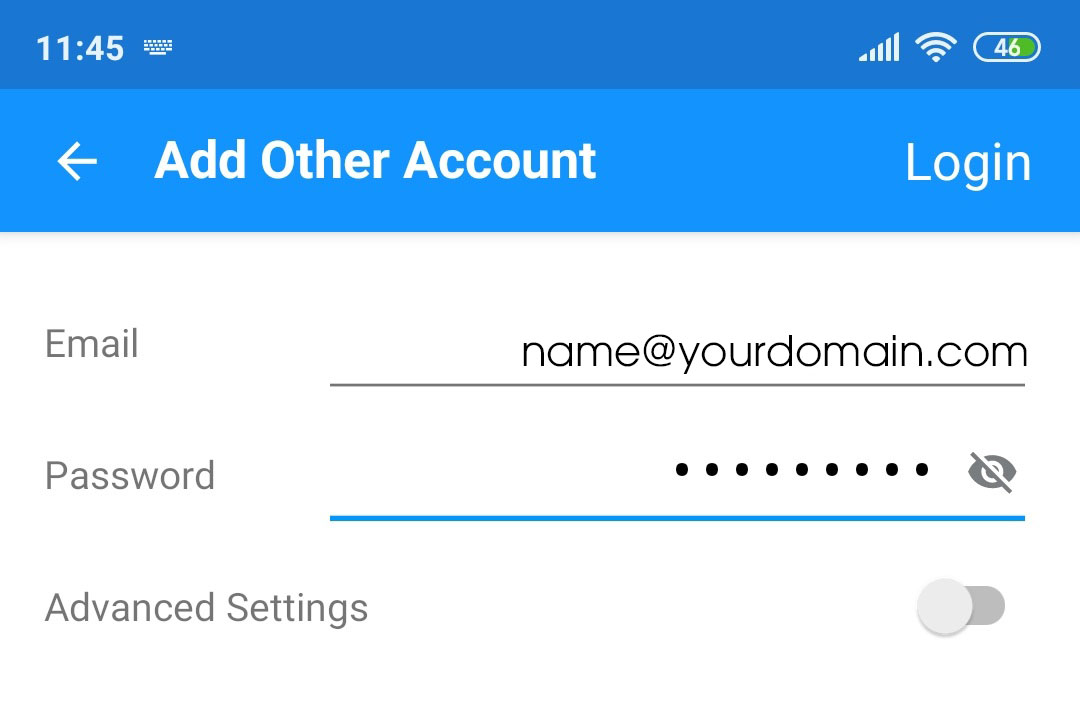
<span style="font-size:16px;">Nhập thông tin <strong>Email </strong>và <strong>Password </strong>tương ứng vào các ô:</span>

<div style="text-align:center"><img alt="otheracount" height="717" src="https://www.buctuongso.com/uploads/news/2021_04/mail-android/otheracount.jpg" width="1080" /></div>
<br  />
<br  />
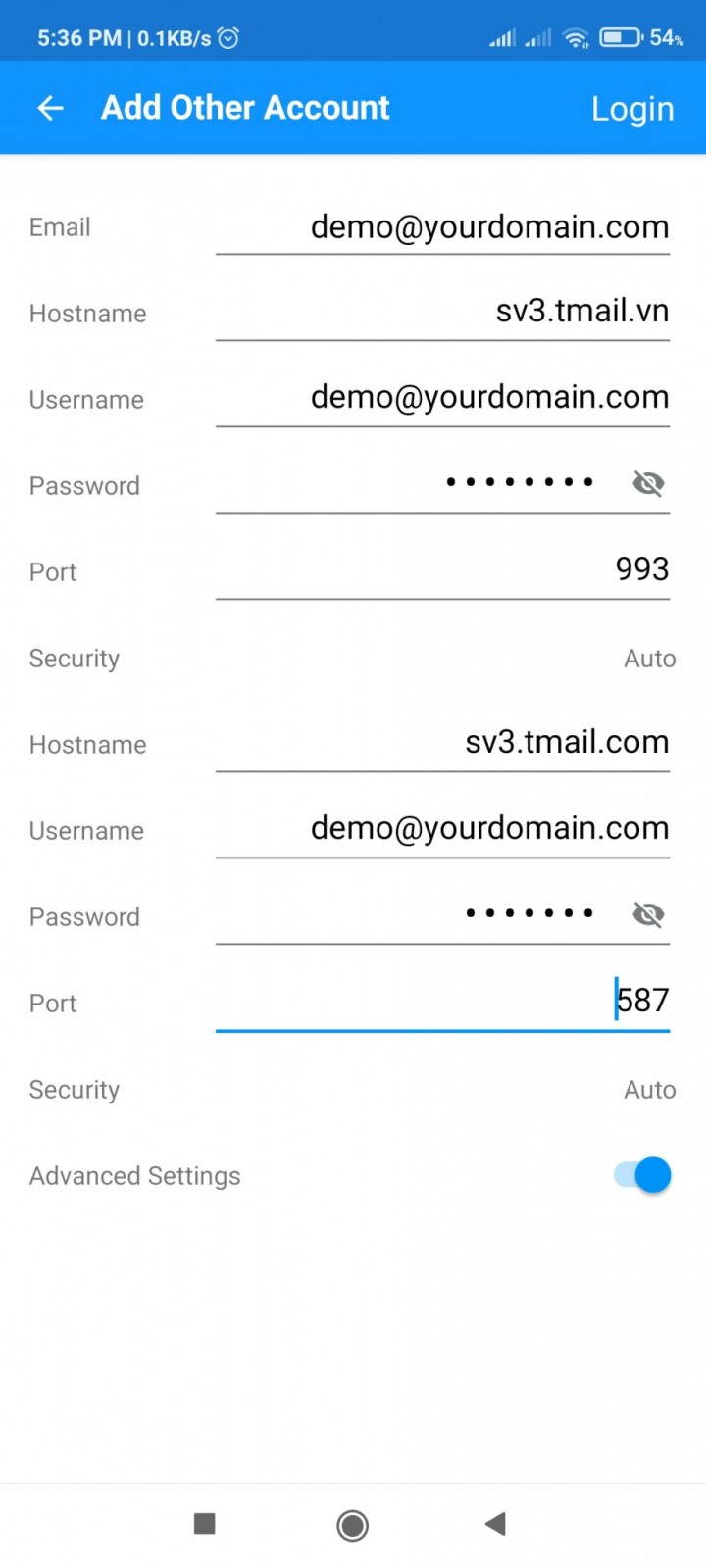
<span style="font-size:16px;">Nhấn button ở hàng<strong> Advanced Settings</strong> để bật cấu hình các thông số cho Email hoặc nhấn vào Login ở góc phía trên bên phải màn hình:</span>
<div style="text-align:center"><img alt="mail3" height="1600" src="https://www.buctuongso.com/uploads/news/2021_04/mail-android/mail3.jpg" width="720" /></div>
<br  />
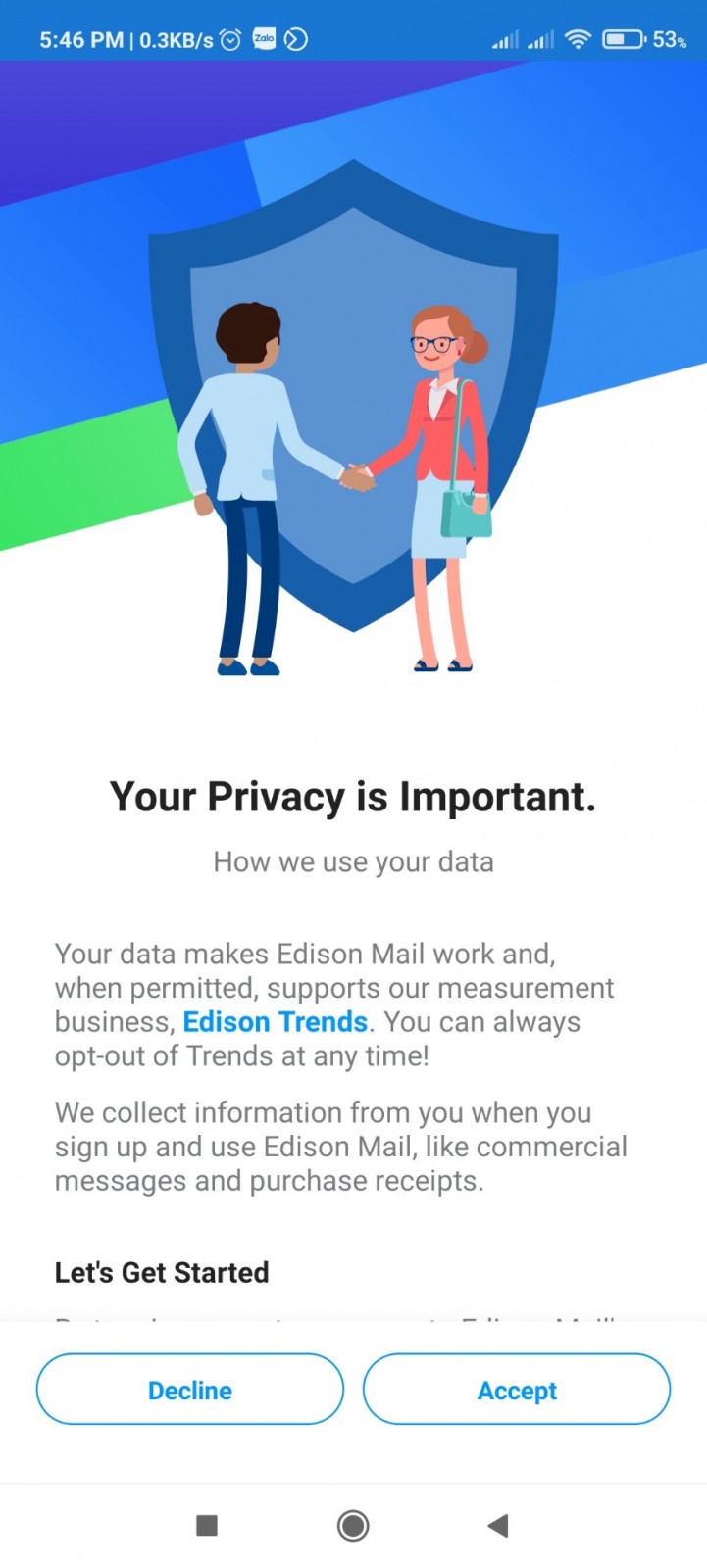
<span style="font-size:16px;"><strong>Cấu hình các thông số tương ứng như hình trên bao gồm thông tin đăng nhập Email server , Port Imap là 993 , Port của SMTP sẽ là 587 vì dùng TLS khi đó Email mới hoạt động được, ở dòng Hostname sẽ là sv3.tmail.vn. Nhập đầy đủ và đúng thông tin yêu cầu sau đó nhấn chọn Login –&gt; Continue to box để hoàn tất cấu hình. Nếu cài đặt lần đầu thì sẽ có thêm bước là chọn Accept để hoàn tất đăng nhập Email, các lần đăng nhập sau sẽ không cần bước này</strong>:</span><br  />
&nbsp;
<div style="text-align:center"><img alt="mail4" height="1600" src="https://www.buctuongso.com/uploads/news/2021_04/mail-android/mail4.jpg" width="721" /></div>
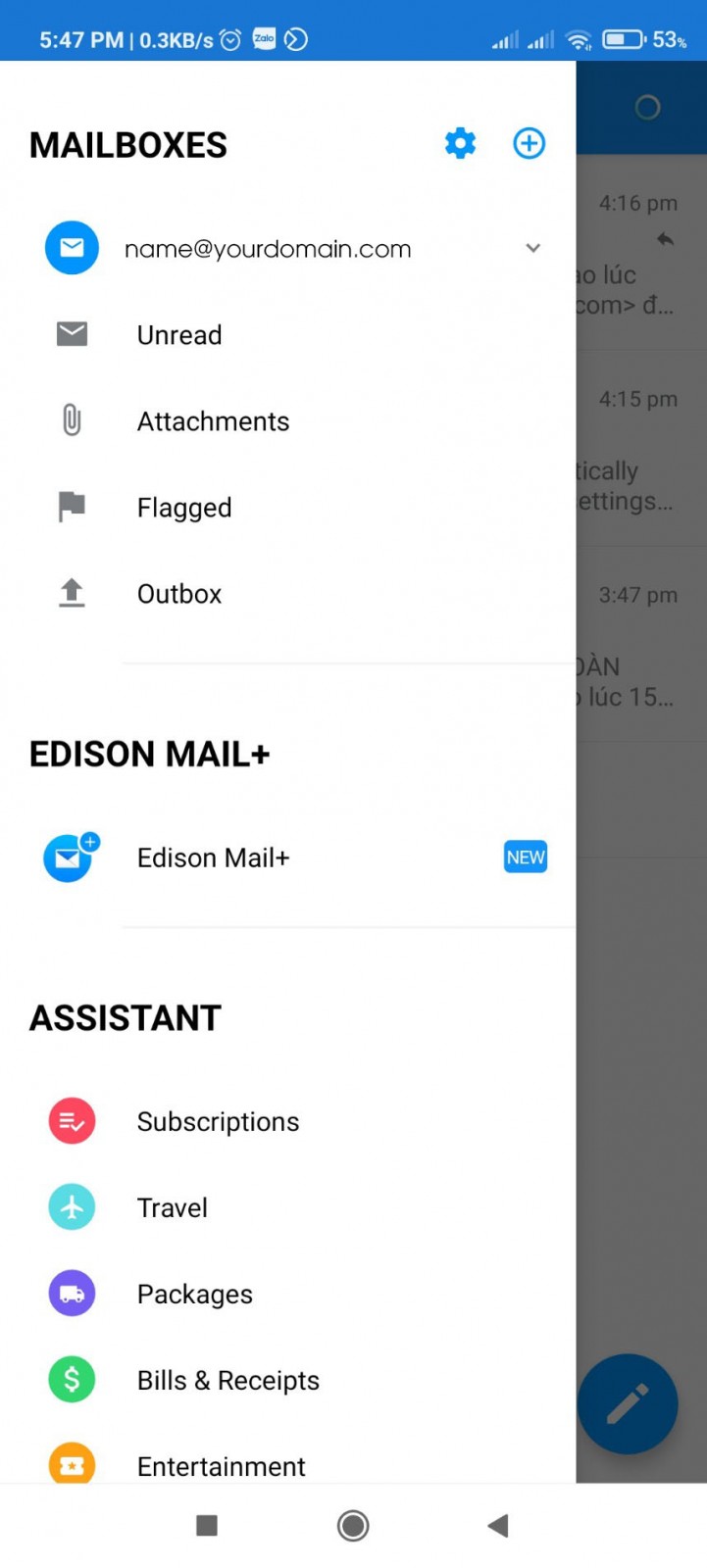
<span style="font-size:16px;">Sau khi đăng nhập thành công, sẽ có giao diện như bên dưới:</span><br  />
&nbsp;
<div style="text-align:center"><img alt="mail6" height="1600" src="https://www.buctuongso.com/uploads/news/2021_04/mail-android/mail6.jpg" width="721" /></div>
&nbsp;

<p><span style="font-size:16px;"><strong>Bây giờ chúng ta có thể sử dụng Email server trên điện thoại đơn giản và thuận tiện.</strong></span></p>

<p><span style="font-size:16px;">Nếu trong quá trình cài đặt và cấu hình Email server lên ứng dụng Email có lỗi,&nbsp;vui lòng liên hệ gửi Email về mail&nbsp;<b><i>admin@buctuongso.com</i></b></span></p>
		</div>
	</div>
	<div id="footer" class="clearfix">
		<div id="url">
			<strong>URL của bản tin này: </strong><a href="https://www.buctuongso.com/kien-thuc-chung/huong-dan-cau-hinh-email-server-tren-smartphone-android-24.html" title="Hướng dẫn cấu hình Email Server trên SMARTPHONE ANDROID">https://www.buctuongso.com/kien-thuc-chung/huong-dan-cau-hinh-email-server-tren-smartphone-android-24.html</a>

		</div>
		<div class="clear"></div>
		<div class="copyright">
			&copy; Đăng ký tên miền, hosting uy tín tại Việt Nam
		</div>
		<div id="contact">
			<a href="mailto:webmaster@localhost">webmaster@localhost</a>
		</div>
	</div>
</div>
        <div id="timeoutsess" class="chromeframe">
            Bạn đã không sử dụng Site, <a onclick="timeoutsesscancel();" href="https://www.buctuongso.com/#">Bấm vào đây để duy trì trạng thái đăng nhập</a>. Thời gian chờ: <span id="secField"> 60 </span> giây
        </div>
        <div id="openidResult" class="nv-alert" style="display:none"></div>
        <div id="openidBt" data-result="" data-redirect=""></div>
<script src="https://www.buctuongso.com/assets/js/jquery/jquery.min.js"></script>
<script>var nv_base_siteurl="/",nv_lang_data="vi",nv_lang_interface="vi",nv_name_variable="nv",nv_fc_variable="op",nv_lang_variable="language",nv_module_name="news",nv_func_name="savefile",nv_is_user=0, nv_my_ofs=-4,nv_my_abbr="EDT",nv_cookie_prefix="btc68",nv_check_pass_mstime=1738000,nv_area_admin=0,nv_safemode=0,theme_responsive=1,nv_is_recaptcha=0;</script>
<script src="https://www.buctuongso.com/assets/js/language/vi.js"></script>
<script src="https://www.buctuongso.com/assets/js/global.js"></script>
<script src="https://www.buctuongso.com/themes/default/js/news.js"></script>
<script src="https://www.buctuongso.com/themes/default/js/main.js"></script>
<script type="application/ld+json">
        {
            "@context": "https://schema.org",
            "@type": "Organization",
            "url": "https://www.buctuongso.com",
            "logo": "https://www.buctuongso.com/uploads/stc-logo.png"
        }
        </script>
<script src="https://www.buctuongso.com/themes/default/js/bootstrap.min.js"></script>
</body>
</html>